
Settings
jvim stores core editor settings in config.toml and AI provider definitions in providers.toml. The settings overlay (F10) gives you a TUI for common settings, provider setup, and an effective-settings view. You can also open the raw config file from that overlay when you need direct TOML editing.
Demo recording in progress — coming in the next release.
Settings Overlay
Section titled “Settings Overlay”Press F10 (or Ctrl+K) to open the settings overlay. The home screen links to quick settings, provider setup, and effective settings. Press e from the overlay to open the raw global config.toml as a normal jvim buffer.
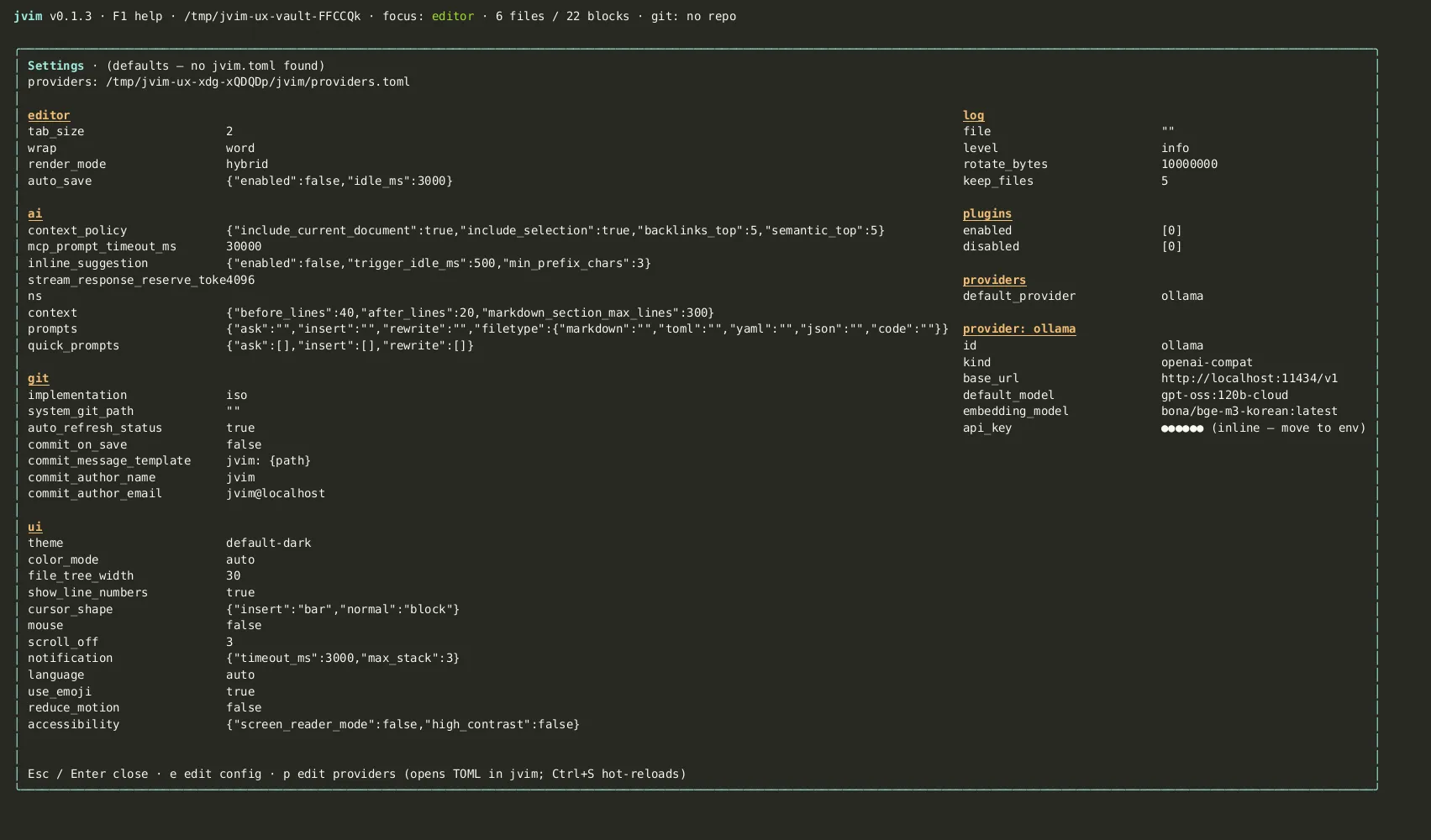
| Keys | Action | Notes |
|---|---|---|
F10 / Ctrl+K | Open settings overlay | Shows quick settings, provider setup, and effective settings |
e | Open raw config | Opens config.toml as a normal editable buffer |
Enter | Apply selected setting | Saves supported quick settings from the overlay |
Esc | Close overlay | Return to the editor |
If you edit TOML directly and introduce a syntax error, jvim keeps using the previous valid configuration until the file is corrected.
Config File Location
Section titled “Config File Location”Core editor configuration lives at:
~/.config/jvim/config.tomlAI providers live at:
~/.config/jvim/providers.tomlYou can edit either file with any text editor outside of jvim. Changes made externally are picked up the next time jvim starts.
Key Configuration Sections
Section titled “Key Configuration Sections”Editor
Section titled “Editor”[editor]tab_size = 2line_numbers = truescroll_off = 5AI Providers
Section titled “AI Providers”schema_version = 1default_provider = "openai-cloud"
[[providers]]id = "openai-cloud"kind = "openai-compat"base_url = "https://api.openai.com/v1"api_key_env = "OPENAI_API_KEY"default_model = "gpt-4o"inline_model = "gpt-4o-mini"See AI Overlay for the full provider setup guide.
Updates
Section titled “Updates”[updates]check_on_start = true # set to false to disable npm update checksF1 Help Overlay
Section titled “F1 Help Overlay”F1 opens an in-app keymap reference. It lists the main shortcuts grouped by category and can be scrolled with the arrow keys.
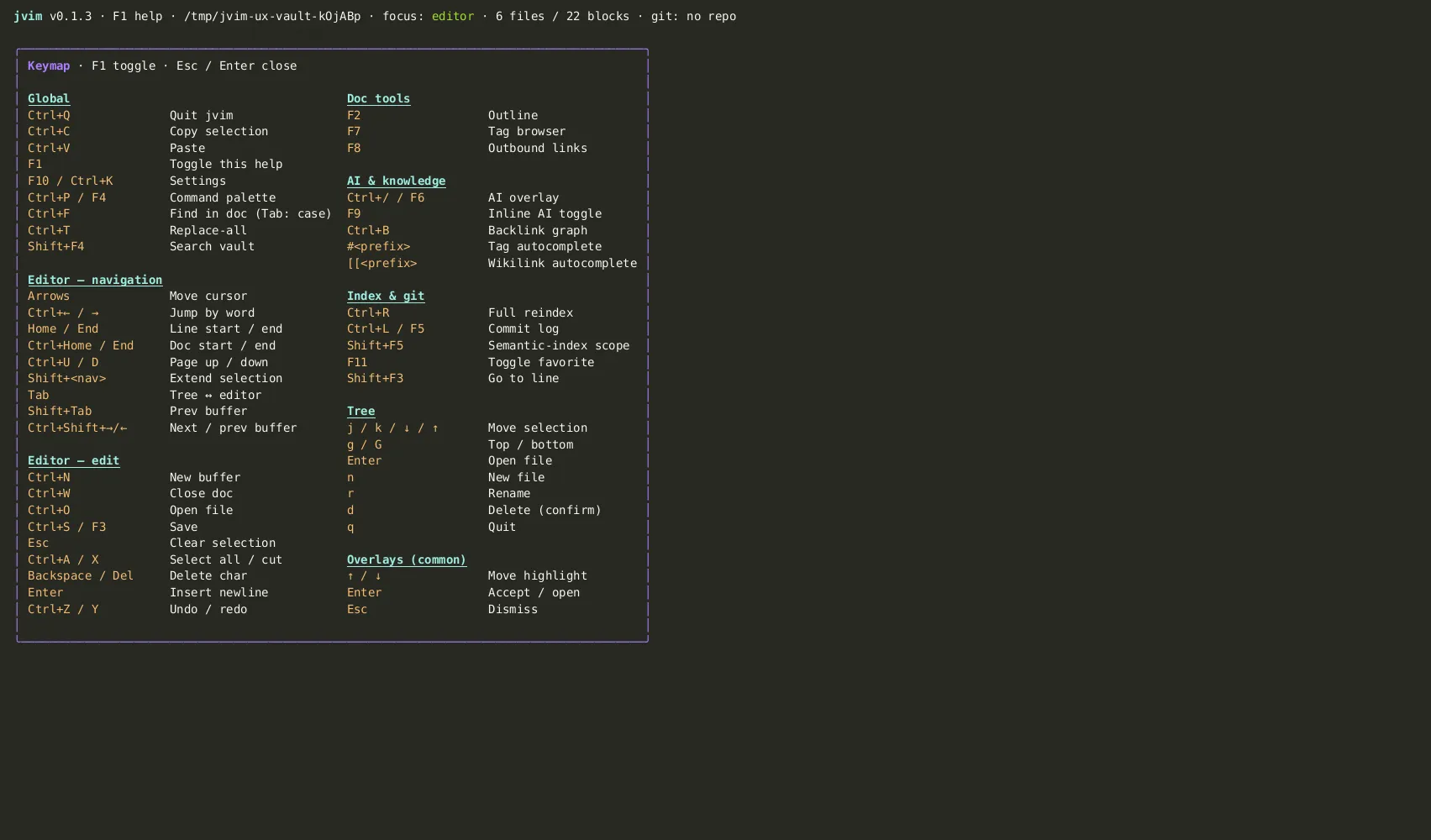
| Keys | Action | Notes |
|---|---|---|
F1 | Open keymap help overlay | Shortcut reference, always available |
↑ / ↓ | Scroll help | Move through the shortcut sections |
Esc | Close help | Return to the editor |
The help overlay is a quick in-app reference — for the full annotated keymap, see Keymap — full reference.
First-Run Defaults
Section titled “First-Run Defaults”When jvim launches without a config.toml, it uses built-in defaults. For AI setup, jvim creates a commented providers.toml template when possible so you can uncomment and fill in the provider you want.
You can adjust common settings later via F10, or edit config.toml / providers.toml directly.
Settings Reload Without Restart
Section titled “Settings Reload Without Restart”Supported quick settings changed through the F10 overlay are written immediately. Changes made by editing TOML directly are picked up on the next jvim start.