
Formatting
jvim’s built-in formatter tidies your buffer without moving focus. Format the whole document in one keystroke, or limit the change to a selected region. Markdown lists get consistent spacing and numbering; code and config files are normalized with a Prettier-style pass where supported.
Demo recording in progress — coming in the next release.
Format Current Document
Section titled “Format Current Document”Press Alt+F to run the formatter over the entire current buffer. The result appears in-place — jvim does not open a diff or a secondary pane. You can keep typing immediately after formatting; the cursor stays in the editor.
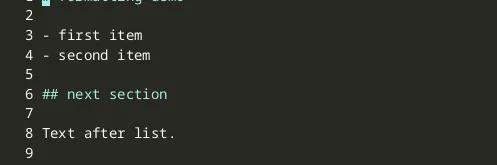
For Markdown files the formatter:
- Corrects unordered-list indentation and bullet consistency.
- Re-numbers ordered lists that have drifted out of sequence.
- Normalises blank lines around headings and fenced code blocks.
For supported code and config files (JSON, YAML, JavaScript, TypeScript, CSS, HTML, and similar Prettier-backed formats) the formatter applies a Prettier-compatible style.
| Keys | Action | Notes |
|---|---|---|
Alt+F | Format current document | Applies to the entire buffer; cursor stays in place |
Ctrl+S | Save | Review the formatted result in the buffer before committing to disk |
Format Selection
Section titled “Format Selection”If you want to reformat only part of a document, select the region first with Shift+Arrow or Shift+Click, then press Alt+Shift+F. Only the selected lines are touched; the rest of the buffer is left exactly as-is.
| Keys | Action | Notes |
|---|---|---|
Alt+Shift+F | Format selection | Requires an active selection; no-op when nothing is selected |
Selection-only formatting is useful when a file mixes hand-crafted prose with auto-generated tables or code blocks that should stay verbatim.
Review Before Save
Section titled “Review Before Save”Formatting is applied to the in-memory buffer immediately, but the file is not saved automatically. Use Ctrl+S to write to disk once you are satisfied. If the result is not what you expected, Ctrl+Z undoes the format operation in a single step.
| Keys | Action | Notes |
|---|---|---|
Ctrl+Z | Undo | Reverts the entire format operation at once |