
Semantic Index
jvim’s Tier 2 semantic index generates vector embeddings with sqlite-vec and stores them locally alongside your vault. Unlike full-text search, the semantic index lets the AI Ask mode find conceptually related notes even when they share no keywords. You choose exactly which files to index — jvim never silently embeds your entire vault.
Demo recording in progress — coming in the next release.
Opening the Scope Picker
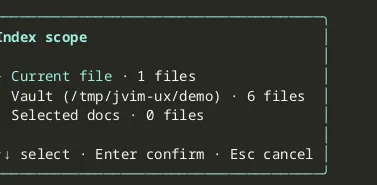
Section titled “Opening the Scope Picker”Press Shift+F5 to open the scope selection dialog. The dialog presents scope options and waits for your choice before doing any work.
| Keys | Action | Notes |
|---|---|---|
Shift+F5 | Open semantic scope picker | No embeddings are built until you confirm a scope |
Esc | Cancel | Closes the dialog without modifying the index |
Scope Options
Section titled “Scope Options”| Scope | What gets indexed |
|---|---|
| Current file | Only the file that is open in the editor. Fast; useful for a quick AI-assisted review of a single note. |
| Open docs | Files currently open in editor tabs. Useful when you are working across a small set of notes. |
| Vault | Every file in the vault. The most complete index; prompts a confirmation dialog before starting because it may take time on large vaults. |
| Selected docs | Files matched by your selected-document rules. Useful when you want a repeatable subset without indexing the entire vault. |
After choosing a scope, jvim builds (or incrementally updates) the embedding index in the background. A progress indicator appears in the status bar while the build is running.
Large-Scope Confirmation
Section titled “Large-Scope Confirmation”When you select Vault and the vault contains many files, jvim shows a confirmation dialog that estimates the number of files to be embedded. This gives you a chance to review the scope and the expected processing time before committing. Press Enter to proceed or Esc to cancel.
| Keys | Action | Notes |
|---|---|---|
Enter | Confirm and start embedding | Dismisses the confirmation dialog and begins the build |
Esc | Cancel the confirmation | Returns to the scope picker; no files are embedded |
Selected Documents
Section titled “Selected Documents”The Selected docs scope uses the selected-document rule manager in the scope dialog. You can add files or folders to keep a repeatable indexing subset without embedding the whole vault.
| Keys | Action | Notes |
|---|---|---|
Shift+F5 → Selected docs | Manage selected scope | Choose files or folder rules for the semantic index |
F11 | Toggle favorite | Marks the current file for quick reference in the file tree |
AI Ask Mode and RAG
Section titled “AI Ask Mode and RAG”Once the index is built, AI Ask mode (F6 → Ask) can use it as the retrieval source. When you ask a question, jvim embeds your query and fetches the most semantically relevant chunks from the index to include as context. The quality of the RAG context depends directly on the scope you chose: a broader, up-to-date index produces more relevant results.
Re-run Shift+F5 whenever you add notes you want available in the AI context.