
Git Integration
jvim treats a vault directory as a git repository. The status bar shows live diff counts for the current file, a dedicated panel lists per-file hunks, and the command palette exposes commit, push, pull, and fetch without leaving the editor. Under the hood jvim uses the system git binary — your existing credential helper, SSH agent, and GPG signing config all apply automatically.
Demo recording in progress — coming in the next release.
Live Diff in the Status Bar
Section titled “Live Diff in the Status Bar”While editing, the status bar header shows a live +N / −M count of added and removed lines relative to the last commit. The count updates each time you save. A zero count means the file is clean.
This indicator gives you a constant read on how far the working tree has drifted from HEAD without opening any overlay.
Commit Log Overlay
Section titled “Commit Log Overlay”Ctrl+L opens the commit log overlay — a list of recent commits with author, short SHA, and commit message. Use it to review history or verify that a recent commit landed.
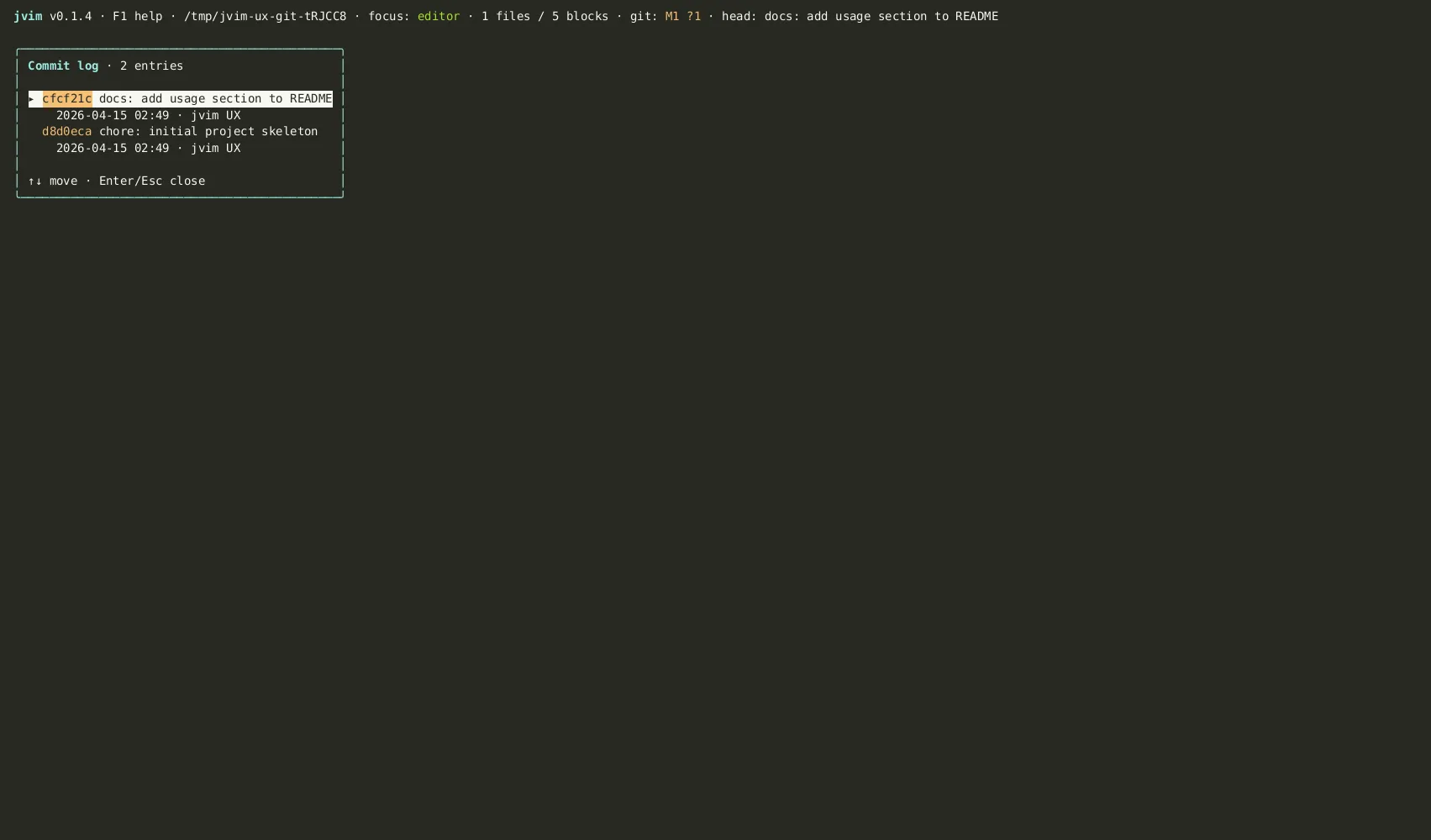
| Keys | Action | Notes |
|---|---|---|
Ctrl+L | Open commit log | Shows recent commits: author, SHA, message |
↑ / ↓ | Navigate entries | Browse the commit list |
Esc | Close overlay | Return to the editor |
Git Panel
Section titled “Git Panel”F5 opens the Git panel for the current repository. From there you can inspect current-file hunks and run common git actions.
| Keys | Action | Notes |
|---|---|---|
F5 | Open Git panel | Shows current-file git status and panel actions |
d | Open current-file diff | Shows diff hunks for the active file |
c | Commit current file | Prompts for a message and stages the active file |
p / P / f | Push / pull / fetch | Runs the corresponding system git command |
Current-File Diff Hunk Panel
Section titled “Current-File Diff Hunk Panel”The diff hunk panel shows uncommitted changes in the current file broken into individual hunks — the same view you’d get from git diff HEAD <file>, rendered inline.
| Keys | Action | Notes |
|---|---|---|
Ctrl+P / F4 | Open command palette | Type "diff" to open the current-file diff panel |
Each hunk shows the old and new lines side by side. Navigate hunks with arrow keys. The panel is read-only — changes are made in the editor buffer as normal and saved with Ctrl+S.
Commit, Push, Pull, Fetch
Section titled “Commit, Push, Pull, Fetch”Git operations are available through the Git panel (F5) and selected command-palette actions (F4 or Ctrl+P). Type the operation name to filter:
- commit — opens the Git panel; use
cthere to commit the current file. - push — pushes the current branch to its upstream remote.
- pull — fetches and fast-forwards (
--ff-only). If the local branch has diverged, the pull is refused rather than creating a merge commit. Rebase or reset manually before retrying. - fetch — fetches from the remote without merging.
| Keys | Action | Notes |
|---|---|---|
F5 | Open Git panel | Diff and current-file commit actions |
F4 / Ctrl+P | Open command palette | Type git action names to find available operations |
Progress and errors appear as toast notifications in the status bar. A push that requires authentication will prompt via the system credential helper or SSH agent — jvim does not manage credentials itself.
System Git Under the Hood
Section titled “System Git Under the Hood”jvim shells out to the git binary found on your PATH. This means:
- Your
~/.gitconfig(user name, email, signing key) is respected. - SSH agent forwarding works without any extra configuration in jvim.
- GPG or SSH commit signing follows your existing git config.
.gitignorefiles are honored for all git operations.
If git is not on your PATH, git integration is silently disabled and the diff indicator is not shown.
Re-indexing After Checkout
Section titled “Re-indexing After Checkout”The vault search database and link metadata are vault-aware and survive git checkout without corruption. If you switch branches and the vault contents change significantly, trigger a manual re-index:
| Keys | Action | Notes |
|---|---|---|
Ctrl+R | Re-index vault | Rebuilds the full-text search database and link metadata |